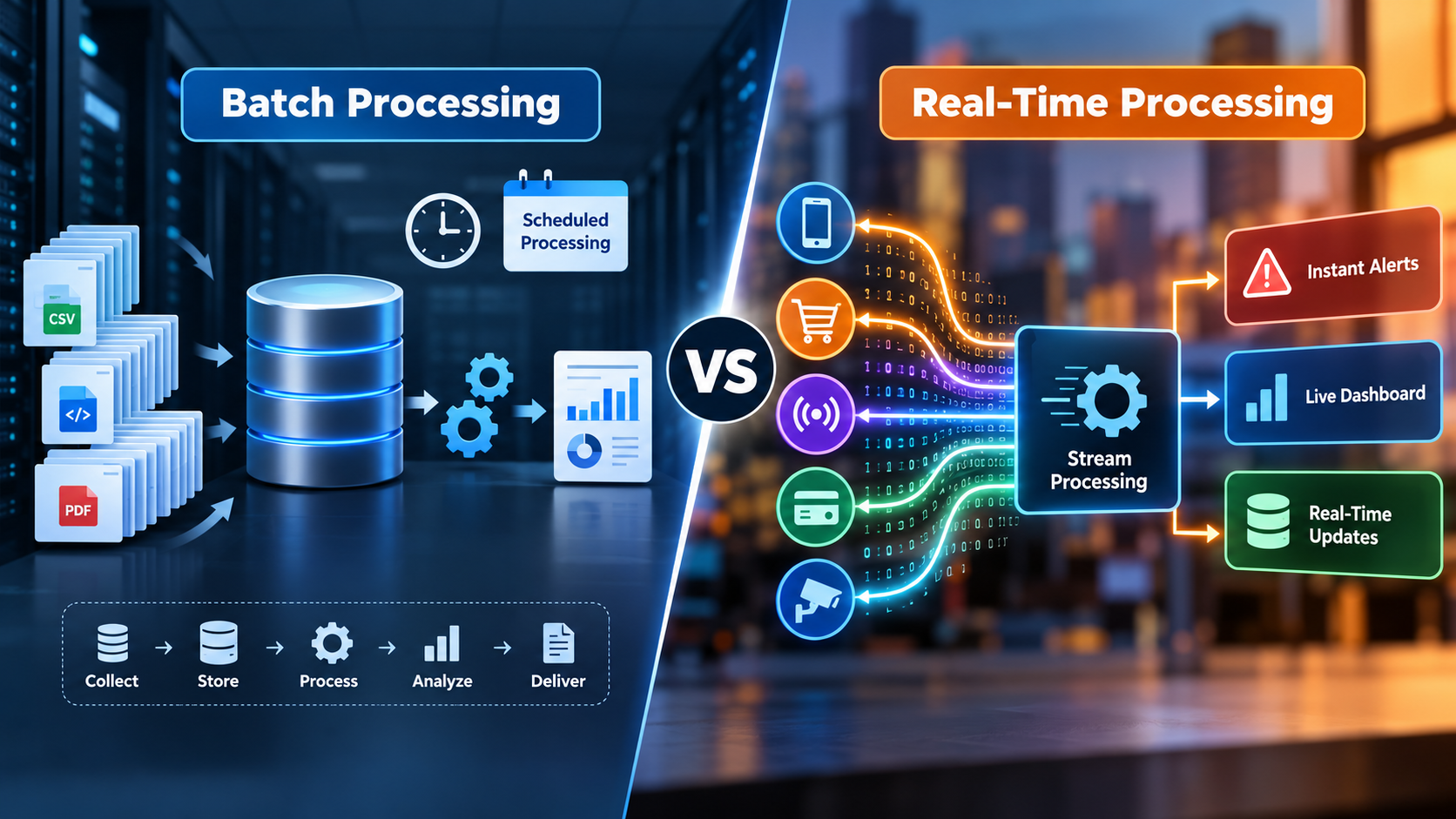
According to the official Apache Spark Structured documentation, data processing can support both traditional batch workloads and low-latency streaming applications. This flexibility matters for businesses that need to analyze historical records while responding quickly to new events.
Batch processing and real-time processing serve different purposes. Batch processing collects data and processes it in groups, making it suitable for scheduled reports, billing, and historical analysis. Real-time processing handles incoming events as they occur, supporting applications such as fraud detection, live inventory updates, and instant alerts.
Understanding batch processing vs real-time processing helps businesses choose an appropriate data architecture, balance infrastructure costs, and improve decision-making. In this guide, we explore the key differences, benefits, limitations, practical use cases, and factors to consider when selecting the right approach.
What Is Batch Processing?
Batch processing collects data over a period, stores it, and processes it together in one run. The data set is bounded, which means it is finite and has a clear start and end. Because the job sees the whole set, it can sort, aggregate, and join across the entire dataset.
How batch processing works
- Collect: Systems gather records such as orders, transactions, or logs.
- Store: The records land in a database, file store, or data lake.
- Trigger: A schedule or event starts the job, for example every night at 2 a.m.
- Process: The job cleans, transforms, and aggregates the data.
- Deliver: Results load into a data warehouse, report, or downstream system.
Where batch processing fits
- Payroll and invoicing
- End-of-day reconciliation
- Monthly and quarterly reporting
- ETL (extract, transform, load) into a data warehouse
- Training machine learning models on historical data
What Is Real-Time Processing?
Real-time processing handles each event as it arrives. The data is unbounded, so it arrives continuously and might never end. The system reacts in milliseconds or seconds, not hours.
How real-time processing works
Events flow from a source, such as an app, sensor, or payment system, into an event transport layer. A stream processing engine filters, enriches, or aggregates them on the fly. The output then triggers an alert, updates a dashboard, or feeds an application.
Real-time vs near real-time vs streaming
These terms get mixed up, so here is a clean way to separate them:
- Real-time: Results arrive fast enough to act on the event itself, usually in milliseconds to seconds.
- Near real-time: Results arrive with a short delay, often seconds to minutes. This works for most dashboards and monitoring.
- Streaming: This describes how data flows, continuously and event by event. A streaming pipeline can deliver real-time or near real-time results.
Engineers also split real-time into hard and soft. A hard system must never miss its deadline, like an airbag controller. A soft system can miss it occasionally, like a live sports score feed.
Batch Processing vs Real-Time Processing: Key Differences
Start with one idea. Batch asks, “What happened over this period?” Real-time asks, “What is happening right now?”
Latency, data volume, and data freshness
Batch jobs trade latency for throughput. They process huge volumes efficiently, but results arrive after the run finishes. Real-time systems return results quickly, but each event gets less processing time.
Cost and infrastructure
Batch jobs run on a schedule and release resources when they finish. Real-time pipelines run around the clock. They need always-on infrastructure, monitoring, and alerting. Exact costs depend on your volume and cloud setup, so model both options before you commit.
Accuracy, error handling, and reprocessing
With batch, you validate the full data set before anyone uses it. If a job fails, you fix the cause and rerun it. Real-time systems must handle late, duplicate, and out-of-order events as they happen. That takes careful design.
Complexity and team skills
Batch logic is easier to write, test, and debug. Real-time work adds concepts such as event time, state, and exactly-once delivery. Plan for those skills before you promise instant insights.
Comparison table
| Factor | Batch Processing | Real-Time Processing |
| Data type | Bounded, finite data sets | Unbounded, continuous event streams |
| Trigger | Schedule, file arrival, or manual run | Each event as it arrives |
| Latency | Minutes to hours or longer | Milliseconds to seconds |
| Throughput | Very high for large volumes | Depends on stream design and scale |
| Data freshness | Stale between runs | Current |
| Typical cost profile | Lower, since compute stops after each job | Higher, since pipelines run continuously |
| Error recovery | Rerun the job | Needs replay, checkpoints, and state handling |
| Complexity | Lower | Higher |
| Best for | Reports, billing, ETL, historical analysis | Fraud alerts, live tracking, personalization |
| Common tools | Apache Spark, Hadoop, scheduled ETL | Apache Kafka, Apache Flink, Spark Structured Streaming |
| Example | Nightly sales summary | Card fraud check at checkout |
Benefits and Limitations of Each Approach
Benefits of batch processing
- Efficient for large data volumes
- Lower and more predictable compute cost
- Simple to test, audit, and rerun
- Works well for complete, historical analysis
Limitations of batch processing
- Insights arrive late
- Problems stay hidden until the next run
- Poor fit for time-sensitive decisions
Benefits of real-time processing
- Instant alerts and actions
- Better customer experience through live personalization
- Faster response to fraud, outages, and demand shifts
Limitations of real-time processing
- Higher infrastructure and operating cost
- Harder to design, monitor, and debug
- Needs strong data quality controls upstream
Real-time is not a replacement for batch. Even the Apache Flink community notes that treating batch as a special case of streaming does not mean any stream processor is the right tool for batch workloads.
Micro-Batch and Hybrid Architectures
Most real systems sit somewhere between the two extremes.
Micro-batch processing
Micro-batch processing cuts a stream into tiny batches and runs each one fast. Apache Spark Structured Streaming runs queries as a series of small batch jobs by default, with latency around 100 milliseconds. Spark 4.1.0 also added a Real-time Mode that processes records continuously rather than at batch boundaries. Micro-batch suits teams that want near real-time results with familiar batch logic.
Lambda vs Kappa architecture
Lambda architecture runs a batch layer and a speed layer in parallel, then merges both in a serving layer. You get complete results from batch and fresh results from streaming. The main criticism is that it requires two separate codebases that must produce consistent results.
Kappa architecture uses a single stream-processing pipeline for both real-time and historical data. You replay the stream to reprocess history. It is simpler to maintain but needs a streaming platform that stores enough history.
Use Cases by Industry
Batch processing use cases
- Finance: End-of-day settlement, statements, and regulatory reports
- Retail: Weekly sales analysis and demand forecasting on historical data
- HR: Payroll runs and benefits processing
- Marketing: Monthly attribution and campaign performance reports
Real-time processing use cases
- Finance: Card fraud detection at the moment of purchase
- Retail and e-commerce: Live inventory updates and product recommendations
- Healthcare: Patient monitoring alerts from connected devices
- Logistics: Vehicle tracking and dynamic route changes
- SaaS: In-app behavior tracking that triggers onboarding messages
- IoT and manufacturing: Sensor monitoring that flags equipment faults early
Practical Example: Batch vs Real-Time Processing in E-Commerce
Consider an e-commerce company that handles thousands of orders every day. It can use both batch processing and real-time processing to manage sales data and inventory efficiently.
Real-time processing for inventory updates: When a customer places an order, the system immediately updates the available stock. This helps prevent overselling and keeps product availability accurate across sales channels.
Batch processing for daily sales reports: At the end of the day, the company processes its order records together to calculate total sales, revenue, popular products, and daily performance. These reports help managers identify trends and plan future inventory requirements.
How the two approaches work together:
- A customer places an order on the website.
- Real-time processing updates inventory and confirms availability.
- Order data is collected throughout the day.
- Batch processing analyzes the collected data after business hours.
- Managers use the resulting reports to make purchasing and sales decisions.
This example shows that batch processing and real-time processing are complementary approaches. Real-time processing supports immediate operational decisions, while batch processing provides a broader view of business performance. Combining them allows businesses to respond quickly while maintaining reliable historical reporting.
Common Tools and Technologies
Pick tools by category, not by brand.
- Batch engines: Apache Spark and Hadoop-based systems
- Event transport: Apache Kafka, which often serves as the intermediary store feeding both batch and speed layers
- Stream processors: Apache Flink and Spark Structured Streaming
- Unified models: Apache Beam, which delegates to different runtimes depending on whether data is bounded or unbounded
- Dashboards and BI: Tools that turn processed data into decisions, covered by our data visualization services
Tools matter less than the data pipeline design around them. A solid pipeline also needs reliable analytics on top, which is where data analytics services help teams turn processed data into action.
How to Choose: A 5-Question Decision Framework
Ask these five questions in order.
1. How fast must you act on the data?
If a delay of hours changes nothing, choose batch. If a delay of seconds costs money or trust, choose real-time.
2. How much data do you process?
Very large, complete data sets favor batch. High-speed event flows favor streaming.
3. What can you afford to run?
Always-on pipelines cost more to operate. Compare that cost against the value of faster decisions.
4. How strict are accuracy and compliance needs?
Reports that must reconcile to the cent often belong in batch. Fraud checks may need real-time plus a later batch correction.
5. Can your team support it?
Real-time systems need monitoring, on-call coverage, and streaming skills. If you lack them, consider micro-batch or a partner.
Quick decision checklist
- Need action in seconds? Choose real-time processing.
- Need complete, audited results? Choose batch processing.
- Need both? Use a hybrid or micro-batch design.
Common Mistakes to Avoid
- Defaulting to real-time: Teams build streaming pipelines for reports that nobody reads before Monday.
- Ignoring data quality: Faster bad data only spreads errors faster.
- Skipping replay planning: Every real-time system needs a way to reprocess events after a bug.
- Running two codebases without tests: Lambda setups drift apart without strict checks.
- Forgetting the end user: A live dashboard is useless if people check it weekly.
How Processing Choice Shapes Analytics and AI
Your processing model decides what your analytics and AI can do.
Scheduled loads fit executive dashboards, trend analysis, and model training. Live streams fit alerts, scoring, and automation. Teams that build AI and machine learning solutions often train models in batch, then score new events in real time.
The same logic applies to customer data. Weekly pipeline reviews in Salesforce CRM analytics rarely need streaming. Predictions that guide a live sales conversation might. If you want forecasts inside your CRM, explore Salesforce Einstein Discovery predictions. Automated workflows that react to events are the territory of agentic AI services.
How to Move from Batch to Real-Time Without Breaking Reporting
- List your decisions. Write down which choices need faster data.
- Rank them by value. Start with the one where delay costs the most.
- Add an event stream beside your batch job. Keep the nightly load running.
- Compare outputs. Check that streaming results match batch results.
- Add monitoring and alerts before you trust the live feed.
- Retire batch logic only where the stream proves stable.
This gradual path protects your existing reports while you build new capability.
Frequently Asked Questions
Batch processing collects data over a specific period and processes it together in scheduled jobs. Real-time processing handles events as they arrive, delivering results within milliseconds or seconds. Batch processing is ideal for historical analysis and scheduled reporting, while real-time processing supports immediate decisions, fraud detection, and live monitoring.
No, real-time processing is not always better. It is valuable when immediate action affects business outcomes, such as preventing fraud or updating inventory. Batch processing is often more practical for payroll, billing, and periodic reporting. Businesses should evaluate processing speed, infrastructure costs, data volume, and operational requirements before choosing an approach.
Micro-batch processing divides incoming data into small groups and processes them at short intervals. It combines aspects of traditional batch processing and continuous streaming to deliver near-real-time results. Apache Spark Structured Streaming uses micro-batching by default, making it suitable for applications that need frequent updates without processing every event individually.
Batch processing is generally more cost-effective because computing resources can be released after scheduled jobs finish. Real-time processing often requires continuously running infrastructure, monitoring, and additional operational support. However, actual costs depend on data volume, processing complexity, cloud pricing, and performance requirements. Businesses should compare total operating costs before selecting an architecture.
Businesses should choose batch processing when data does not require immediate action. Common applications include payroll, billing, financial reconciliation, scheduled reports, and historical data analysis. Batch processing works particularly well with large datasets that require aggregation, validation, and transformation. It also supports predictable workloads and makes failed jobs easier to rerun and investigate.
Real-time processing is commonly used for payment fraud detection, live vehicle tracking, inventory updates, IoT sensor alerts, and personalized product recommendations. These applications process incoming events quickly enough to support timely decisions. For example, a payment system can evaluate a transaction during checkout and flag suspicious activity before the transaction is completed.
Stream processing describes how data is handled continuously as events arrive, while real-time processing describes how quickly results become available. Streaming systems can support real-time applications, but their actual speed depends on workload, infrastructure, and system design. A streaming pipeline that experiences delays may deliver near-real-time results rather than immediate responses.
Yes, many companies combine batch and real-time processing to balance data completeness and freshness. Batch processing supports historical analysis and scheduled reporting, while real-time processing enables immediate alerts and operational decisions. Lambda architecture uses separate batch and speed layers, whereas Kappa architecture relies on a streaming pipeline that can replay historical events when needed.
Batch processing allows teams to validate, clean, and deduplicate complete datasets before delivering results. Real-time processing requires continuous validation because incoming events may be duplicated, delayed, or received out of order. Both approaches need reliable data quality controls, schema validation, and monitoring. The main difference is when errors are detected and corrected.
Apache Spark, Hadoop-based systems, and scheduled ETL tools commonly support batch processing. Real-time architectures often use Apache Kafka for event transport and Apache Flink or Spark Structured Streaming for processing. Apache Beam provides a unified programming model for bounded and unbounded data. The right tools depend on latency, scalability, infrastructure, and team expertise.
Conclusion
Choosing between batch processing and real-time processing depends on your business goals, data volume, budget, and how quickly decisions need to be made. Batch processing is ideal for scheduled reporting, historical analysis, and large datasets, while real-time processing supports immediate insights, fraud detection, and faster operational responses. Many businesses combine both approaches to balance cost, accuracy, and data freshness.
Before selecting a solution, evaluate your processing requirements, infrastructure, and long-term scalability. A well-designed data pipeline helps transform raw data into reliable, actionable insights. Explore data analytics services to understand how effective data analytics can support better business decisions and more efficient data-driven strategies.